
Kadans for ZwiftmacOS
Ride Zwift
in Turkish.
Menus, workouts, the instructions that pop up mid-ride: Kadans opens Zwift in Turkish on your Mac. When the ride is over and you quit Zwift, everything goes back to the original.
- Easy setupReady in minutes
- Account stays safeYour Zwift account is untouched
- Update-proofTurkish is rebuilt after updates
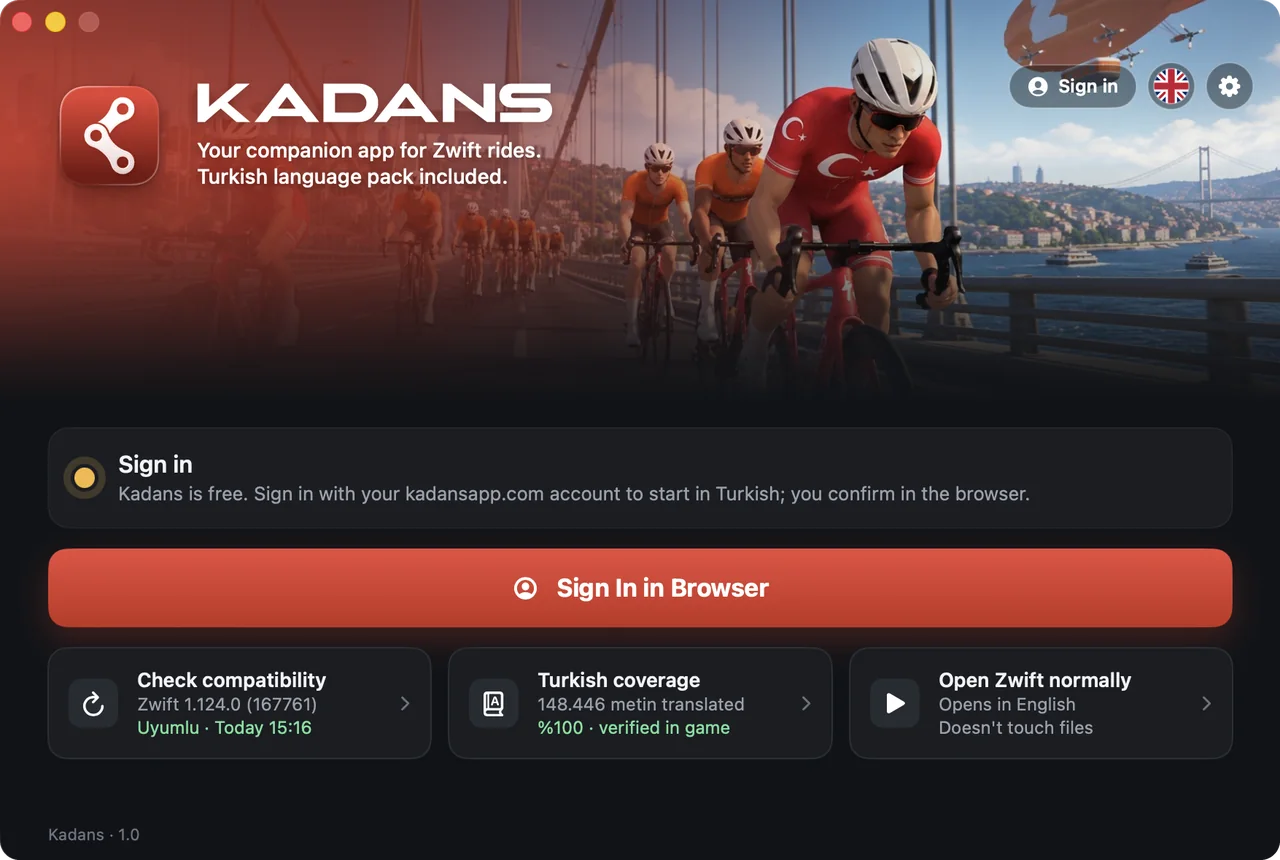
Why Kadans?
Zwift now speaks Turkish
Kadans's translation tables carry Zwift's text into Turkish line by line: from the menu to the ride summary, from workout names to on-screen instructions.
- Main menu, settings, plan screens and ride summaries in Turkish.
- Workout names, descriptions and the instructions that appear during a ride in Turkish.
- When Zwift updates, Kadans rebuilds the Turkish; lines whose text changed stay in English instead of breaking.
- When Zwift closes, the game files go back to the original.
- Main menuJUST RIDESERBEST SÜRÜŞ
- EventsJOIN EVENTETKİNLİĞE KATIL
- AchievementYou received 100 Ride Ons in one ride!Tek sürüşte 100 Ride On aldın!
- Route pickerIncludes lead-in, portal road, and remaining routeGiriş yolu, portal yolu ve kalan rota dahil
- Loading screenDraft like nobody's watching.Kimse bakmıyormuş gibi draft yap.
Your workouts,
in Turkish too
From the warm-up to the last rep, the workout's name, description and on-screen instructions arrive in Turkish. No translating in your head while you ride.
How it works
Riding Zwift in Turkish takes three steps.
Download Kadans
Kadans is free. Open the DMG and drag Kadans to your Applications folder.
Sign in, start in Turkish
Sign in with your free Kadans account and press "Start Zwift in Turkish". Kadans backs up the original files and builds the Turkish files on your Mac.
Quit, as before
When Zwift closes, the files go back to the original. Open Zwift the usual way and it starts in English.

Whichever city you ride in,
in Turkish.
From Watopia to London and New York: whichever map you ride, menus and instructions are in Turkish.
Alongside your ride
Besides Turkish, small helpers that don't interrupt your ride.
Window layout
When Zwift opens, the game window fills the remaining screen space and the Kadans sidebar docks beside it.
Control without breaking your ride
A menu bar icon and a floating button put settings and ending your session one click away.
Steps aside in full screen
Put Zwift in full screen and the sidebar hides on its own, then comes back when you exit.
Push to talk
Hold a key and speak; your words go to the in-game chat as text, and your hands stay on the bars.
Coming soonTraining plans
Week-by-week plans built around your goal.
Coming soon
System requirements
- macOS 12 or laterTested on Apple Silicon Macs
- Zwift installedTested with Zwift 1.124.0
- Internet connectionFor Zwift and signing in to Kadans
- 300 MB free spaceFor the original-file backup and Turkish files
Donate
Kadans runs on its users' donations.
Kadans is free: no subscription, no ads. The servers, the Turkish translation refreshed after every Zwift update and new features are paid for by donations from the people who use Kadans. If Kadans made your rides Turkish, a small donation helps keep it going.
Donations don't unlock anything: Kadans is equally free for everyone. Sign in to your Kadans account before you donate and the badge is added automatically.
Servers and updates
Keeping downloads and engine and translation updates running every day.
Turkish that stays current
Translating new text and adding it to the Turkish tables after every Zwift update.
New features
What's on the way: push-to-talk, training plans and a Windows version.
The people who keep Kadans going
1 person has helped keep Kadans free. Thank you all!
- Köksal F.
- Your name here

Donors appear here with their first name, last initial and profile photo; anyone can hide theirs from their profile.
Frequently asked
If something else is on your mind, write to us.
Does it cost anything?
No, Kadans is free for everyone. No subscription, no ads; every feature is open to all.
Why do I need an account?
You sign in with a free Kadans account to start Turkish. That way we can see how many people use Kadans and recognise our supporters. Your Kadans account has nothing to do with your Zwift account.
What changes if I donate?
Your donation pays for Kadans's servers, translation updates and new features, and a Supporter badge appears on your account and in the app. Donations don't unlock anything; every Kadans feature stays open to everyone either way.
Will it affect my Zwift account?
No. Your account and rides stay as they are; Turkish only appears on your Mac.
What if I open Zwift without Kadans?
Zwift opens in English as usual.
What happens when Zwift updates?
Kadans adapts to the update on its own and Turkish keeps working.
Does it work on Windows?
Only on Mac for now. We're working on a Windows version; leave your email in the form at the bottom of the page and we'll let you know the day it's out.
Which Macs does it run on?
Macs with an M-series chip running macOS 12 or later.
What if I see a warning on first launch?
Click "Open Anyway" in System Settings › Privacy & Security. You only need to do this once.
Why does it ask for permission?
To place the game window on screen. It doesn't record your screen.
Are you affiliated with Zwift?
No. Kadans is an independent app.
Make your next ride a Turkish one.
Download Kadans for Zwift and start Zwift in Turkish.
- Free for everyone
- Easy setup
- Your Zwift account stays the same
- Update-proof
Windows version on the way
Leave your email and we'll send you a single message the day Kadans launches on Windows.